 |
 |
 |
This use case describes a dedicated Beacon instance for the World Ocean Database (WOD) for fast, on-demand subsetting of ocean profile data. The basis for this work has been developed within the BlueCloud2026 project (now EOSC Node - Digital Twin of the Ocean) where it has been used within the VRE as resource for research on physical parameters, but this WOD Beacon instance including Python Notebooks to work with the data is now fully open to all.
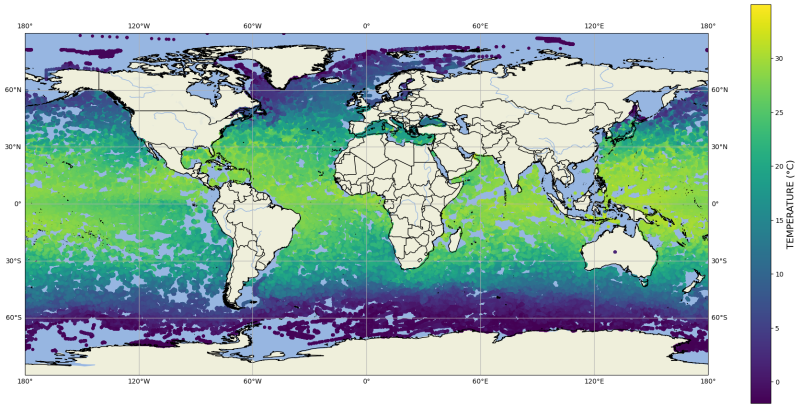
World Ocean Database temperature data (2022-2023) accessed via Beacon using the notebook example below.
Datacollection context
WOD is NOAA NCEI's flagship archive of oceanographic profile observations, supported by IOC-IODE. It aggregates global historical and modern measurements into a consistent, quality-controlled collection that supports climate, oceanography, and marine science workflows.
Use case goal
Make WOD profiles directly queryable without downloading or indexing millions of NetCDF files. Users can select only the columns and time/space ranges they need and receive results immediately.
How Beacon is used
A Beacon instance is deployed using docker. WOD NetCDF files are converted into Beacon Binary Format (BBF) collections. BBF consolidates many source files into a small number of optimized datasets that support efficient filtering and projection.
Benefits for users:
- Query the full WOD collection with server-side filters.
- Directly access the WOD from your notebooks on the fly.
- Retrieve only required columns and rows.
- Avoid local preprocessing and large downloads.
Example workflow
Use the Jupyter notebook example to connect to the Beacon node, inspect schemas, and run queries with the Beacon Python SDK.
Install the SDK
pip install beacon-api
Connect
from beacon_api import Client

client = Client("https://beacon-wod.maris.nl")
Inspect available columns
available_columns = client.available_columns_with_data_type()
list(available_columns)[:50]
Query a subset
query_builder = client.query()

query_builder.add_select_column("wod_unique_cast")
query_builder.add_select_column("Platform", alias="PLATFORM")
query_builder.add_select_column("Institute", alias="INSTITUTE")
query_builder.add_select_column("Temperature", alias="TEMPERATURE")
query_builder.add_select_column("Temperature_WODflag", alias="TEMPERATURE_QC")
query_builder.add_select_column("Temperature.units", alias="TEMPERATURE_UNIT")
query_builder.add_select_column("z", alias="DEPTH")
query_builder.add_select_column("z.units", alias="DEPTH_UNIT")
query_builder.add_select_column("time", alias="TIME")
query_builder.add_select_column("lon", alias="LONGITUDE")
query_builder.add_select_column("lat", alias="LATITUDE")
query_builder.add_select_column(".featureType", alias="FEATURE_TYPE")

query_builder.add_range_filter("TIME", "2022-01-01T00:00:00", "2023-01-01T00:00:00")
query_builder.add_is_not_null_filter("TEMPERATURE")
query_builder.add_not_equals_filter("TEMPERATURE", -1e+10)
query_builder.add_equals_filter("TEMPERATURE_QC", 0.0)
query_builder.add_range_filter("DEPTH", 0, 10)

df = query_builder.to_pandas_dataframe()
df